Example

Monday, February 22, 2010

WeddingChannel.com just launched brand-new personal wedding websites, including exclusive website designs from Monique Lhuillier, Vera Wang, Oscar de la Renta, and Lela Rose. We all know brides love personalizing their wedding, so this is another way a Vera- or Monique-clad bride can actually have a wedding website that ties in with her wedding gown designer.
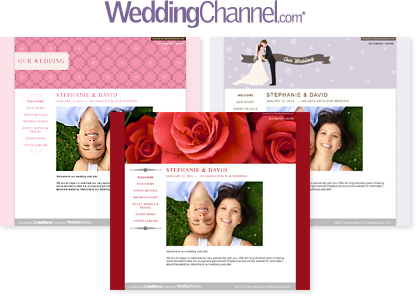

“Brides love tying in a signature detail throughout the entire wedding to create a chic, cohesive look,” said Sharon Stimpfle, deputy site director of WeddingChannel.com. “We’re thrilled that Oscar de la Renta, Lela Rose, Monique Lhuillier, and Vera Wang are working with WeddingChannel.com so brides can incorporate their favorite wedding designers in their personal wedding websites too.”

WeddingChannel.com Free Wedding Website Features:
Hundreds of Personalization Options
Upload Multiple Photos
Wedding Maps Feature
Interact With Guests
Gift Registry
Find Coordinating Wedding Items
Matching Save-the-Date Emails

Labels: , , , , ,

Monday, February 08, 2010

Wedding Website Woes

Mr. Cathedral Heights works as a computer programmer, so naturally I’d envisioned him being incredibly excited about putting together an amazing wedding Website for us. Right? Wrong.

No matter. Plan B: Make the Website myself. I figured it couldn’t be that hard—just choose a service, fill in the information, and you’re set. However, as I spent more time researching each site than I thought I’d spend actually building one, I began to realize that it isn’t so easy. As with every piece of the wedding planning puzzle, complicated details emerge that you would never have imagined, details that constitute entire college majors. I scoured the net for affordable or free packages and finally decided on one that coincided with a very well known wedding site. This particular one appealed to me because, for a small fee, I could have the domain name I wanted, which meant the url would fit on the Save the Date postcards we were soon sending. I entered my credit card information and reserved our domain name. Or so I thought.

The morning after purchasing our domain, which the site assured me was available, I prepared to get to work and instead found that suddenly the domain name we bought was unavailable. Unfortunately, my aunt, an artist, had already put the url we created on the handmade original Save the Date that she’d planned on bringing to the printers that day. (Please note: If you are getting married, this type of incident will most likely happen more than once in the planning process). I asked her to hold off while I sent a barrage of messages to customer service. Days passed and I didn't hear back. I finally called my credit card company and asked them to dismiss the charge, as I couldn’t get in touch with the service provider.

Fortunately, a friend mentioned iWeb, a Mac application that helps the average user make a Website. I’ve always been a PC girl; however, I recently started a new job and have been using a Mac for the first time in years. Along with a tiny bit of help from my brother/Man of Honor and Mr. Cathedral Heights (it’s amazing how little advice they had to share with me, both being in technology fields…men…), I figured out how to build us a site using iWeb, and my brother generously offered to host the site with his mobile me account. I don’t have a full understanding of how it all works, but I’m almost finished adding photos and text and I was able to snag a short yet personalized domain name.

And, of course, the original wedding Website got back to me as soon as I finished building the site on my own. One piece of advice for the brides out there: read the reviews that you can find on website hosts, as some are much more reliable than others. Oh, and don't be too disappointed when plans go awry--you'll find a way to fix it.

Labels: , ,

Tuesday, August 18, 2009

RSVP conundrum - figured out!

So. I can't remember if I'd mentioned any of this before or not but, we are asking our guests to RSVP online (unless they're not computer savvy, we'll send them a reply card). Way back when, I found the WeddingWire.com wedding website, which allows you to add an RSVP page that pulls directly from the guest list you've uploaded to the site - so the guests go to that page and it asks them to enter their name, and if they're on the list they get prompted to RSVP for themselves and whatever guests we've specified, for ceremony/reception/shower/etc (whatever event(s) you want to add in there).

If they're not on the list.. They don't get to RSVP. I loved that because we're not planning to do inner envelopes and all that so I was worried there might be some confusion about who gets to bring a guest.

HOWever. I was not crazy about the look of the rest of the site as built by WeddingWire. So I went over to Google Sites and built one (we splurged and paid $10 for own domain), which I like a Lot better, but I couldn't recreate the fabulous RSVP function.

Well I just finally found the solution, which probably shouldn't have taken me this long to figure out. What I did was deactivated all the regular pages from the WeddingWire wedding site EXCEPT the Welcome screen and the RSVP page, and just renamed it our "online RSVP site." So then all it took was adding an RSVP page on our real website which links right over to the WeddingWire site.

Is this making any sense?? It might sound more complicated than it is - believe me, I am no tech junky! I do not know html or dreamweaver or any other kind of site building software (I don't even know if that's the right vocabulary). If you're not happy with your wedding website and think you might want to try to make your own - I highly recommend Google Sites!

Labels: , , ,